> For the complete documentation index, see [llms.txt](https://docs.tryprotege.com/llms.txt). Markdown versions of documentation pages are available by appending `.md` to page URLs; this page is available as [Markdown](https://docs.tryprotege.com/review/review-tool-concepts/document-review/feedback-cards/trademarks.md).
# Trademarks
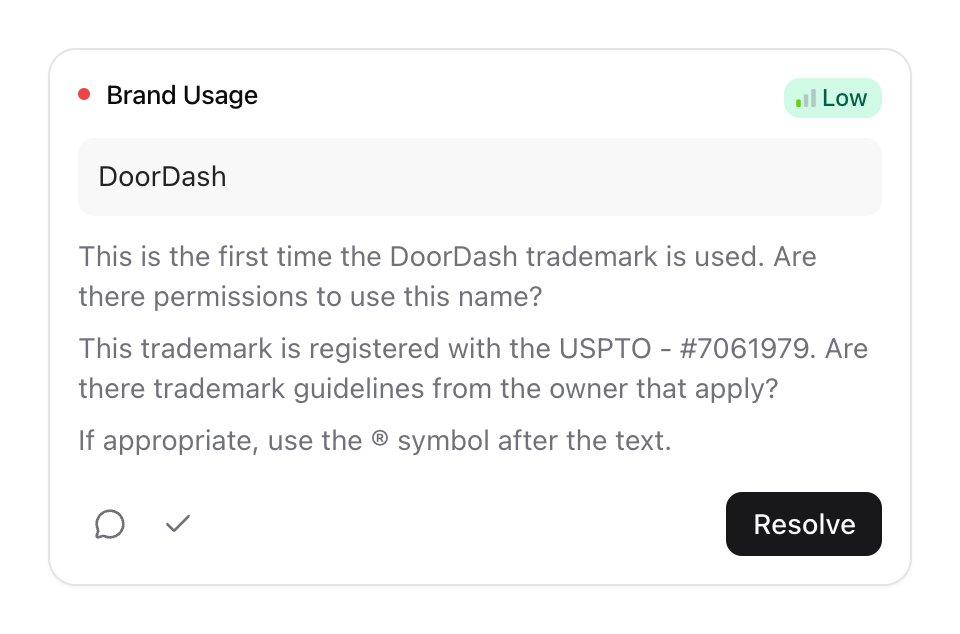
The Trademark feedback feature enhances the document scanning process by providing valuable insights and guidance related to brand name usage and trademark compliance. This feedback is particularly valuable for legal professionals and organizations seeking to protect their brand identity and intellectual property rights. The Trademark feedback encompasses two types of checks: Trademarks and Trademark Types.
**Overview:**
* **Trademarks Check:** The Trademarks check assesses whether the usage of a brand name in the document has been cleared and if it has been previously used elsewhere. If the brand name is encountered for the first time, it can be approved within Protege using the ✅ button.
* **Standing Approval**: Standing approval grants blanket permission for the usage of a brand name, indicating that it has been thoroughly vetted and is cleared for use without further review. Users can also set an expiration time for standing approvals to ensure ongoing compliance.
* **Limited Approval**: For brand names requiring special considerations or limitations, a limited approval can be granted. This allows users to specify restrictions or conditions that are reflected in future references, such as "requires partner legal notification."
* **Trademark Types Check:** Protege will also search the United States Patent and Trademark Office (USPTO) to confirm if the trademark is registered.
* If the trademark is registered, a reminder to check for brand guidelines is added.
* Additionally, the card will show if the TM, SM, or ® is appropriate based on the registration and document context.
You can see a list of all approved trademarks in the Decision Store. Learn more about the[Decision Store](/review/review-tool-concepts/decision-store.md).
By incorporating Trademark feedback into the document scanning process, Protege empowers users to proactively address trademark-related concerns, ensure compliance with intellectual property laws, and safeguard their brand assets effectively. This feature serves as a valuable tool for legal professionals and businesses seeking to maintain brand integrity and mitigate potential legal risks associated with trademark infringement.
---
# Agent Instructions
This documentation is published with GitBook. GitBook is the documentation platform designed so that both humans and AI agents can read, navigate, and reason over technical content effectively. Learn more at gitbook.com.
## Querying This Documentation
If you need additional information that is not directly available in this page, you can query the documentation dynamically by asking a question.
Perform an HTTP GET request on the current page URL with the `ask` query parameter, and the optional `goal` query parameter:
```
GET https://docs.tryprotege.com/review/review-tool-concepts/document-review/feedback-cards/trademarks.md?ask=&goal=
```
`ask` is the immediate question: it should be specific, self-contained, and written in natural language.
`goal` is optional and describes the broader end goal you are ultimately trying to accomplish on behalf of the user. GitBook uses it to tailor the answer towards what is most useful for that goal.
The response will contain a direct answer to the question and relevant excerpts and sources from the documentation.
Use this mechanism when the answer is not explicitly present in the current page, you need clarification or additional context, or you want to retrieve related documentation sections.