> For the complete documentation index, see [llms.txt](https://docs.tryprotege.com/llms.txt). Markdown versions of documentation pages are available by appending `.md` to page URLs; this page is available as [Markdown](https://docs.tryprotege.com/review/review-tool-concepts/brands-and-attributes/setting-up-attributes.md).
# Setting Up Attributes
### Setting Up Attributes
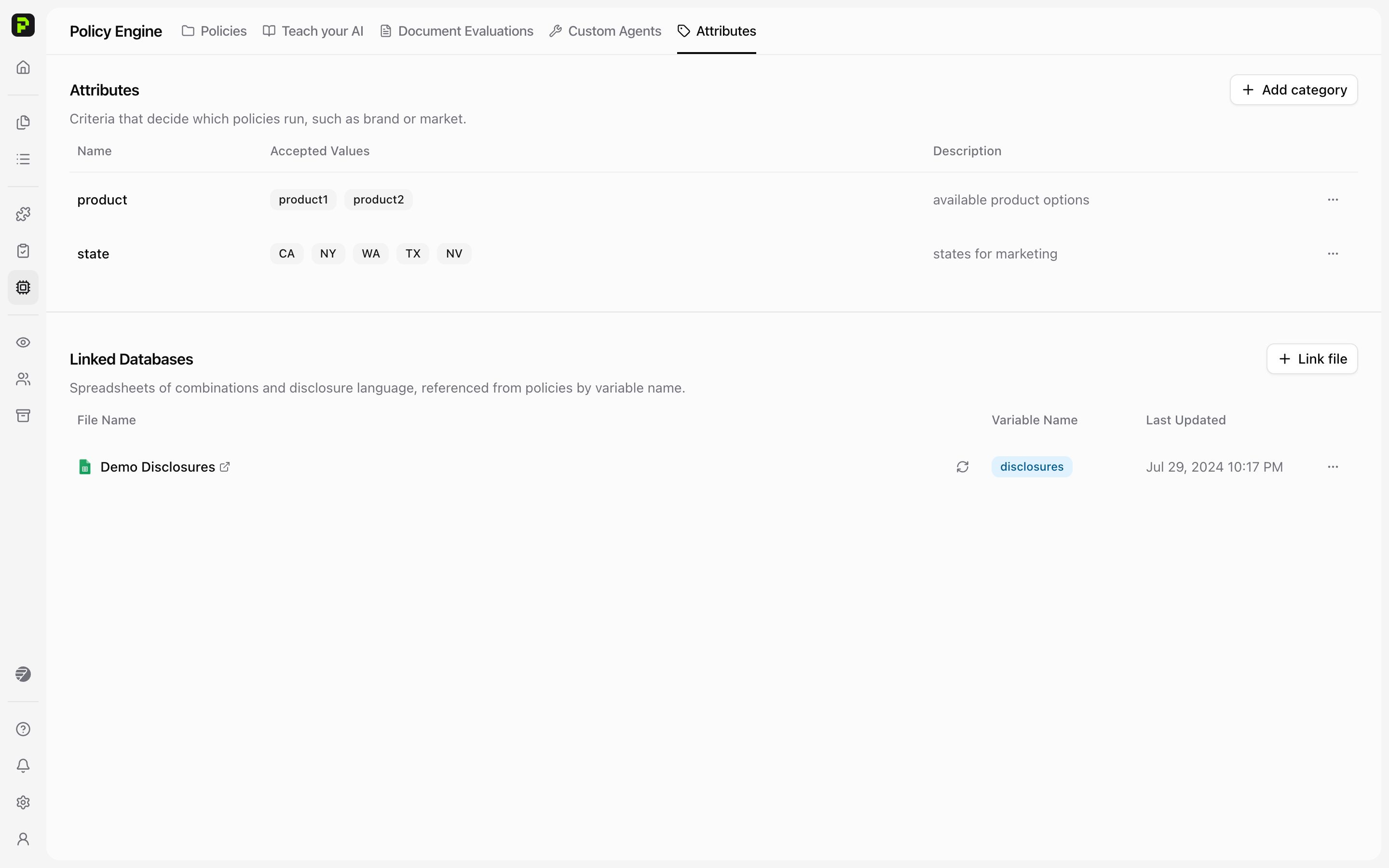
Attributes are managed in **Policy Engine**, not Settings.
1. Open **Policy Engine** from the main menu.
2. Select the **Attributes** tab.
3. Click **Add category**.
4. Enter a **Name** — this is the unique identifier for the Attribute — then click **Create**.
5. In the new row, add **Accepted Values** (the options users can select when tagging content). You can also add a description.
6. Click the checkmark to save. The Attribute is then available for reviews and policy logic.
### Using Dynamic Step Execution with Attributes
Dynamic Step Execution enhances policy flexibility by automatically referencing and applying content from a linked database based on Attribute values. This is especially useful for regulatory scenarios that vary by region, product type, or audience.
#### How It Works:
* Condition-Based Matching:
Each condition (e.g., a U.S. state, audience type, or product category) can have its corresponding regulatory statement stored in a linked database file — one entry per row.
* Automatic Text Retrieval:
When a review is triggered, Protege Review replace a **variable** in the prompt with the content’s Attribute values (e.g., State = California) and fetches the relevant disclosure or text from the database file.
* One Policy, Many Conditions:
Instead of creating multiple policies for each variation, you can configure a single dynamic policy that checks the database and applies the appropriate rule or disclosure based on context.
#### Example:
If a product has different disclosures required for California, Texas, and New York:
* You store each disclosure in the database under the respective state.
* The dynamic step automatically retrieves and applies the correct disclosure based on the State Attribute assigned to the content.
This approach reduces duplication, simplifies policy management, and ensures compliance with varying regulatory requirements — all within a single, efficient policy structure.
{% content-ref url="/pages/dmOCy6kNrGdmbkYkPlmb" %}
[External Databases for Attributes](/review/review-tool-concepts/brands-and-attributes/setting-up-attributes/external-databases-for-attributes.md)
{% endcontent-ref %}
{% content-ref url="/pages/WCrDQhrRwnMSS3yjDBw2" %}
[Add Variables to Steps](/review/review-tool-concepts/brands-and-attributes/setting-up-attributes/add-variables-to-steps.md)
{% endcontent-ref %}
---
# Agent Instructions
This documentation is published with GitBook. GitBook is the documentation platform designed so that both humans and AI agents can read, navigate, and reason over technical content effectively. Learn more at gitbook.com.
## Querying This Documentation
If you need additional information that is not directly available in this page, you can query the documentation dynamically by asking a question.
Perform an HTTP GET request on the current page URL with the `ask` query parameter, and the optional `goal` query parameter:
```
GET https://docs.tryprotege.com/review/review-tool-concepts/brands-and-attributes/setting-up-attributes.md?ask=&goal=
```
`ask` is the immediate question: it should be specific, self-contained, and written in natural language.
`goal` is optional and describes the broader end goal you are ultimately trying to accomplish on behalf of the user. GitBook uses it to tailor the answer towards what is most useful for that goal.
The response will contain a direct answer to the question and relevant excerpts and sources from the documentation.
Use this mechanism when the answer is not explicitly present in the current page, you need clarification or additional context, or you want to retrieve related documentation sections.